How to Make Podcast Clips People Actually Watch
A good podcast episode can contain a dozen moments that would stop someone mid-scroll. A guest tells a story nobody expected. A host says the thing listeners have been thinking. Someone disagrees, and the conversation gets interesting. Most of those moments never leave the full episode, because finding and editing them takes hours most podcasters don't have.
This guide covers how to make podcast clips that hold attention on their own, from choosing the moment to framing, captions, and posting. The short version: pick complete thoughts rather than random segments, frame the person speaking, caption every clip, and publish consistently from each episode.
What makes a podcast clip work?
A podcast clip works when someone who has never heard your show can understand it, care about it, and want more. That usually means three things:
- It's a complete thought. The clip has a clear start, a point, and a payoff. It doesn't begin with "and so that's why" or end before the punchline.
- It hooks fast. The first sentence gives the viewer a reason to stay.
- It's watchable with the sound off. Many people scroll with audio muted, so captions carry the clip until they decide to listen.
Clips that fail usually break one of those rules. They start mid-sentence, take too long to get going, or rely on context the viewer doesn't have.
How to make podcast clips: step by step
Step 1: Record with clips in mind
You'll make better video podcast clips if the recording is set up for them. Give each speaker their own camera angle when possible, or at least frame a wide shot loosely enough that each person can be cropped into a vertical frame. Keep microphones close and consistent. Clean audio matters more for clips than for the full episode, because viewers decide in seconds.
Step 2: Find the moments worth clipping
Look for these podcast clip ideas as you review an episode or transcript:
- A strong opinion stated clearly: "Most people price their services backward."
- A short story with a twist or lesson.
- A surprising fact or number your guest shares from their own experience.
- Practical advice that fits in under a minute.
- A genuine disagreement between host and guest.
- An emotional or funny moment that doesn't need setup.
Reading the transcript is faster than rewatching, because strong lines tend to jump out on the page. Mark the timestamps as you go.
Step 3: Trim to the complete thought
Start the clip at the first sentence that makes sense on its own, and end on the payoff. If the moment depends on a question the host asked earlier, include the question. If the guest rambles before getting to the point, trim the ramble. Aim for the shortest version that still makes complete sense.
Step 4: Reframe to vertical around the speaker
Most podcast clips for social media are posted vertically, in a 9:16 frame for Shorts, Reels, and TikTok. A static center crop often cuts off whoever is talking, especially with two people sitting apart. The frame should follow the active speaker. Our guide on converting horizontal video to vertical explains the cropping, padding, and reframing options in detail.
Step 5: Add accurate captions
Podcast captions should be timed to speech, large enough to read on a phone, and placed where platform buttons won't cover them. Check names, brand terms, and jargon by hand, because automatic transcription often gets them wrong. For styling and placement, see our guide to captions for short-form video.
Step 6: Write a hook and title
If the first line of the clip isn't strong, add short on-screen text that frames what's coming, like "The pricing mistake almost every freelancer makes." Our article on short-form video hooks covers hook patterns that come from unscripted conversation.
Step 7: Export and post
Export each clip in the format your platform expects, then post with a caption that names the episode and guest, plus a clear way to find the full show.
How many clips should you make per episode?
There's no fixed number. A 30-minute solo episode might have three strong moments, while a 90-minute interview could have ten or more. Quality matters more than volume. One clip with a clear, complete idea will usually serve your show better than five that start mid-thought.
A practical rhythm many podcasters use is to post a few clips per episode across the week, spaced out, so every episode keeps working after release day.
Manual editing vs. automatic clipping
| Approach | Best for | Trade-offs |
|---|---|---|
| Manual editing in a video editor | Full creative control, branded templates | Time-consuming, requires editing skills |
| Hiring an editor | Shows with budget and high volume | Ongoing cost, slower turnaround |
| Automatic clipping tool | Regular episodes, small teams, solo hosts | Review needed for accuracy and fit |
Whichever approach you choose, review every clip before posting. Check that it makes sense without context, the captions are correct, and nothing is shared that a guest wouldn't want public.
How ClipperyAI handles podcast clips
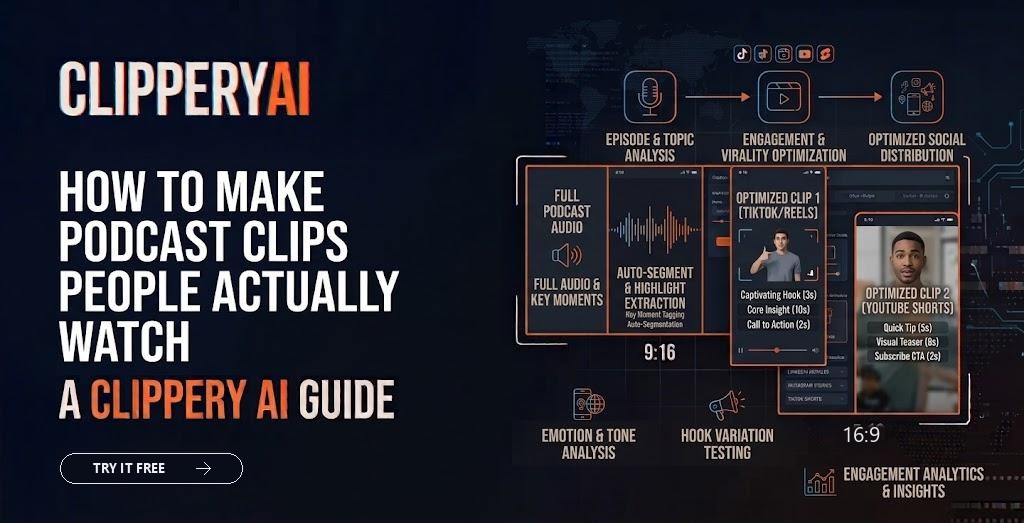
ClipperyAI is a video editing tool that works on your own recordings. You upload an episode file (MP4, MOV, WebM, MKV, or M4V) or paste a link to a video you own or have permission to use. It reads the full recording, looks for complete thoughts with a beginning and payoff, pulls in earlier context when a moment needs it, and spreads clips across the whole episode rather than clustering them in one section. Clips come back reframed around the speaker, with word-timed captions and a hook up front, in 9:16, 1:1, or 16:9.
It doesn't generate new video, images, or voices. It only trims, reframes, and captions the footage you provide. Because it works from video, an audio-only episode would need a video version first.
The Free plan includes 60 minutes a month with videos up to 30 minutes, which is enough to test it on a typical episode. Longer shows fit the paid plans: Starter accepts videos up to 60 minutes and Pro up to 180 minutes. See current details on our pricing section, or read more about the podcast clips use case.
Posting tips to promote a podcast on TikTok, Shorts, and Reels
- Name the guest and topic in the post caption so the clip is searchable.
- Point to the full episode using your profile link or a comment, since links in captions aren't clickable on every platform.
- Post consistently. A steady schedule from each episode tends to build an audience more reliably than one large batch.
- Get guest approval for sensitive clips, and share finished clips with guests so they can repost them.
- Watch which topics perform, not just which clips. Patterns across clips can shape future episodes.
For a full release-week plan, see our guide to promoting a podcast on social media.
Start with your next episode
You don't need a new recording setup or an editing team to repurpose podcast episodes into short clips. Start with the episode you just finished, pick the moments that make sense on their own, frame the speaker, and caption everything.
If you'd like to skip the scrubbing, open the ClipperyAI studio and turn your latest episode into captioned vertical clips.
Frequently asked questions
How long should a podcast clip be?
Long enough to deliver one complete thought, and no longer. Many strong podcast clips land between about 20 and 60 seconds, but a story that needs 90 seconds can work if it holds attention. Start from the moment's natural beginning and end, then trim anything that delays the payoff.
Can I make video clips from an audio-only podcast?
Yes, but you'll need to create a video version first, such as an audiogram with waveforms, a static image with captions, or a recording of the episode with a simple visual. Many podcasters now record video during sessions because talking-head clips usually feel more personal than static visuals.
Do I need permission to post clips of my podcast guests?
It's best practice to cover clip usage in your guest agreement or release form before recording. Most guests expect promotional clips, but written permission avoids misunderstandings. For sensitive or personal moments, ask before posting even if you already have general permission.
Should podcast clips have captions?
Yes. Many people scroll with sound off, so captions help viewers follow the clip before they decide to unmute. Captions also make your content accessible to deaf and hard-of-hearing viewers. Check automatic captions for errors in names, brands, and technical terms before posting.
What's the best aspect ratio for podcast clips?
Vertical 9:16 is the standard for YouTube Shorts, Instagram Reels, and TikTok. Square 1:1 can work for some feeds, and 16:9 suits YouTube's regular player or embedding. Reframe around the active speaker rather than using a fixed center crop, so the person talking stays in frame.
How many podcast clips should I post per week?
There's no universal number. A consistent schedule you can maintain matters more than volume. Many shows post a few clips from each episode spread across the week. Track which topics and formats get watched to the end, then adjust how many clips you make and how often you post.