How to Promote a Podcast on Social Media with Short Video Clips
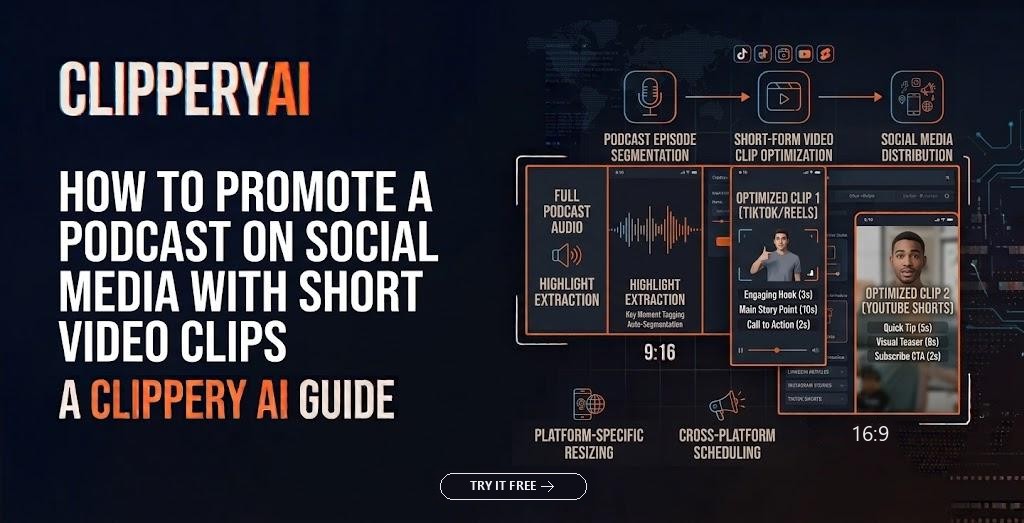
The most dependable way to promote a podcast on social media is to post short, captioned video clips of each episode's best moments, each one understandable to a stranger, with a clear path back to the full episode. Clips work like trailers. They let people hear your voice, see your chemistry with guests and judge your ideas in under a minute before committing an hour to an episode.
A post saying "New episode out now!" with cover art and a link asks a lot of someone who doesn't know you. A clip asks for a minute. This guide covers what to clip, how to schedule clips around a release, how to get guests sharing, and how to tell whether any of it brings in listeners.
Why video clips work for podcast promotion
Social platforms are built around video feeds that regularly show content to people who don't follow you yet. A plain link post mostly reaches existing followers, if it reaches anyone. A strong clip can travel further because it's native to the feed: it plays in place, keeps the viewer in the app, and is judged on whether people watch it.
Clips also help with podcasting's discovery problem. Podcast apps work well once someone is looking for a specific show, but browsing them is a slow way to find hosts you've never heard of. Short video clips give potential listeners a low-risk sample, which is why they sit at the center of so many podcast marketing strategies.
Video podcast clips vs. audiograms
A podcast audiogram pairs an audio excerpt with a static image, a moving waveform and captions. It's the standard option for audio-only shows and it beats a bare link. But when a show is recorded on camera, video podcast clips usually say more: facial reactions, laughter, the moment a guest leans in to disagree.
If your show is audio-only today, even a simple camera setup opens up video clips. ClipperyAI, for example, edits video recordings, so it needs a video file of the episode and won't work from audio alone.
What makes a podcast moment worth clipping
Not every great moment in an episode makes a great clip. Look for moments that work cold, without the 20 minutes that came before:
- Specific advice: a guest gives one clear, actionable recommendation.
- A real disagreement: host and guest push back on each other. Imagine a personal finance show where the host argues for paying off a low-rate mortgage early and the guest, a financial planner, makes the case for investing instead. Viewers pick sides in the comments.
- A story with a turn: something went wrong, then something changed.
- A surprising answer: the guest's expertise contradicts what most people assume.
- A quotable line: one sentence that sums up the episode's argument.
Skip inside jokes, references to earlier segments ("going back to what you said about…"), sponsor reads, and long setups that pay off minutes later. Once you've chosen a moment, the first line matters most; our guide to finding hooks in unscripted footage shows how to pick an opening from a natural conversation.
How to promote a podcast on social media during release week
Tying clips to your release schedule keeps you from posting everything at once or forgetting the episode by Wednesday. Here's a simple rhythm for a weekly show:
- Day before release: a teaser clip that raises a question the episode answers.
- Release day: your strongest clip, with clear directions to the full episode.
- Days 2 to 5: one clip per day, each from a different part of the episode, rotated across platforms.
- Following weeks: evergreen clips from older episodes to fill gaps between releases.
Make the route to the full episode obvious every time. Put the episode title and number in the description, and use your profile link, a pinned comment or an in-description link where the platform allows it. If full episodes live on YouTube, link each Short to the episode with YouTube's related-video option.
Spread clips across the whole episode, too. Five clips from the same five-minute stretch feel repetitive and hide what makes the rest worth hearing. For interviews with a long narrative arc, a numbered multi-part series can beat standalone clips; our article on splitting a long video into parts explains how to end each part so people come back.
Platform-by-platform notes
TikTok rewards personality and strong opinions, and comment threads can turn one disagreement into a running conversation, which is why podcast clips for TikTok often favor debate moments. Instagram Reels suits shows whose hosts already have an Instagram audience; the Collab feature lets you co-post a Reel with a guest so it appears on both profiles. YouTube Shorts is the natural fit when full episodes are on YouTube, since viewers can move straight from a Short to the episode. LinkedIn suits business, career and industry interview shows; square or wide clips are fine there, and a plain description of the lesson often works better than a teaser line.
The same 9:16 captioned clip can usually go to all of them. Rewriting the description for each audience takes a few minutes and is worth it.
Turn guests into a distribution channel
Every guest has an audience you don't, and most will share if you make it effortless. That's the core of podcast guest promotion. During release week, send each guest two or three clips featuring them, ready to post, with a suggested description, the episode link and your handles for tagging. Waiting a month means the moment has passed.
Many shows cover clip use in their guest release form. Even with that in place, check before posting a clip where a guest says something sensitive. A clip that embarrasses a guest costs more goodwill than any views it earns.
Record with clips in mind
- Give each person their own camera angle when possible, or seat guests close enough that a vertical crop can move between them.
- Avoid talking over each other; crosstalk makes captions messy and framing jumpy.
- Have the host restate listener questions aloud so answers stand on their own.
- Light faces well, since clips are mostly close-ups.
- Use decent microphones, because captions and clip selection depend on clear speech.
Making podcast clips with ClipperyAI
ClipperyAI is built for exactly this job. Upload a video episode or paste a link to a video you own. It reads the whole conversation, finds complete thoughts with a beginning and a payoff, pulls in earlier context when a moment needs it, reframes to vertical around whoever is speaking, and adds word-timed captions inside the frame. Turn on Episode series and a story-driven interview becomes a set of connected parts, each ending so viewers want the next. The podcast clips page walks through the details.
Episode length matters when choosing a plan: the free plan handles videos up to 30 minutes, Starter up to 60 and Pro up to 180, which covers most long-form interview shows. You can compare them in the pricing section. Only submit recordings you own or have permission to use, as set out in the ClipperyAI Terms of Service.
How to tell whether clips bring in listeners
Clip views aren't the same as new listeners, so look further down the funnel. Compare your podcast host's download or listener numbers in the days after a clip-heavy release with episodes that got fewer clips. Watch follower growth on your show's YouTube channel and podcast app listings. Note comments from people saying they found you through a clip, and ask new listeners directly how they discovered the show. Give any approach a couple of months before judging it, since a single episode can be an outlier. If you're still choosing a tool, our guide to choosing an AI clip maker suggests testing with one real episode first.
Make every episode work beyond release day
An episode's release day is only the start of its life. With a steady stream of podcast clips for social media, a clear route back to the full episode, and guests who share, each recording keeps introducing your show to new people for weeks. That's how small shows grow a podcast audience without recording extra content. When your next episode is ready, turn it into clips with ClipperyAI and plan your release week around the best of them.
Frequently asked questions
How many clips should I post per podcast episode?
Enough to cover the episode's distinct strong moments without repeating yourself. For a weekly show, three to five clips per episode is a manageable starting point; adjust based on how many moments genuinely stand alone.
How long should podcast clips be?
Long enough to finish one thought. That's often under a minute for reaching new people, and longer for a story with a real payoff.
Should I post the same clip on TikTok, Reels and Shorts?
Usually, yes. A 9:16 clip with burned-in captions works on all three. Adjust the description for each audience and check each platform's current length limits.
Can I make video clips from an audio-only podcast?
Not true video clips. Audiogram tools can turn audio into a visual post, or you can start recording video. ClipperyAI requires a video recording of the episode.
Do I need permission to post clips of my guests?
Get clear agreement, ideally in your guest release form before recording, and use judgment with sensitive moments even when you have it.